Triggers
AVRO can generate database audit triggers from table definitions in ddl.ini. The generator is configuration-driven: the application decides which business tables must be audited, and the framework owns the shared audit log tables.
How Audit Triggers Work
Audit triggers are enabled per table in /application/config/ddl.ini.
When a table has tb_config.trigger.audit.enabled = true, AVRO generates database triggers for the configured actions:
insertupdatedelete
The generator does not create a separate log table for each audited table. Instead, all audited tables write to two shared framework tables:
change_logs
change_log_refs
These shared tables are described in /application/config/ddl.ini and are created only when at least one application table has audit enabled.
The flow is:
audited table
  -> database trigger
  -> change_logs
  -> change_log_refs
For example, if the checking table is audited, AVRO can generate:
trg_checking_audit_insert
trg_checking_audit_update
trg_checking_audit_delete
Shared Audit Tables
change_logs
Stores the main audit event.
Important columns:
source_table   audited table name
source_id      primary key value from the audited row
action_type    insert, update, or delete
edit__user_id  actor user id, if available
edit_date      business edit date or configured fallback
ip             request IP, if available
old_data       old row data or changed old values
new_data       new row data or changed new values
change_log_refs
Stores searchable references for fast filtering.
Important columns:
change_log_id  related row from change_logs
ref_type       logical reference type
ref_id         referenced id value
edit_date      same audit date used for the log
For very large audit datasets, ref_type can later be replaced by a dictionary table and a numeric ref_type_id.
Creating The Audit Tables
Add the shared audit table definitions to /application/config/ddl.ini.
[CHANGE_LOGS]
id={"bigint":"20"}
source_table={"varchar":"128"}
source_id={"bigint":"20"}
action_type={"varchar":"20"}
edit__user_id={"int":"11"}
edit_date={"datetime":""}
ip={"varchar":"45"}
old_data={"longtext":""}
new_data={"longtext":""}
tb_config={"indexes":[{"name":"idx_change_logs_source","columns":["source_table","source_id"]},{"name":"idx_change_logs_user","columns":["edit__user_id"]},{"name":"idx_change_logs_date","columns":["edit_date"]}]}

[CHANGE_LOG_REFS]
id={"bigint":"20"}
change_log_id={"bigint":"20"}
ref_type={"varchar":"128"}
ref_id={"bigint":"20"}
edit_date={"datetime":""}
tb_config={"indexes":[{"name":"idx_change_log_refs_log","columns":["change_log_id"]},{"name":"idx_change_log_refs_ref","columns":["ref_type","ref_id"]},{"name":"idx_change_log_refs_date","columns":["edit_date"]}]}
Then run the generator:
/manage/generate_audit_triggers
The generator creates missing audit tables and indexes before creating triggers. If the audit tables already exist, it adds missing columns declared in ddl.ini.
Enabling Audit For A Table
Add an audit block to the table's tb_config in /application/config/ddl.ini.
Example for the CHECKING table:
[CHECKING]
id={"int":"11"}
document_id={"int":"11"}
subject_id={"int":"11"}
checking__user_id={"int":"11"}
checking_start_date={"datetime":""}
status={"int":"3"}
tb_config={"type":"main","trigger":{"audit":{"enabled":true,"actions":["insert","update","delete"],"pk":"id","actor":{"user_id_column":"checking__user_id","user_id_fallback":"NULL","date_column":"checking_start_date","date_fallback":"NOW()"},"refs":[{"type":"document_id","column":"document_id"},{"type":"subject_id","column":"subject_id"},{"type":"checking_user_id","column":"checking__user_id"}],"data":{"mode":"changed_columns","ignore":["checking_start_date"],"include":[]}}}}
The JSON must be valid and must stay on one INI value line.
Audit Config Reference
enabled
Enables audit trigger generation for the table.
"enabled": true
actions
Defines which database actions are audited.
"actions": ["insert", "update", "delete"]
pk
Primary key column used as change_logs.source_id.
"pk": "id"
The column must exist in the same table definition.
actor
Defines where the actor and edit date are read from.
"actor": {
  "user_id_column": "checking__user_id",
  "user_id_fallback": "NULL",
  "date_column": "checking_start_date",
  "date_fallback": "NOW()"
}
If the configured row value is empty, the generator uses the fallback expression.
refs
Defines searchable references written to change_log_refs.
"refs": [
  { "type": "document_id", "column": "document_id" },
  { "type": "subject_id", "column": "subject_id" }
]
Each column must exist in the audited table.
data
Controls what is stored in old_data and new_data.
"data": {
  "mode": "changed_columns",
  "ignore": ["checking_start_date"],
  "include": []
}
When mode is changed_columns, update triggers store only columns whose values changed.
ignoreexcludes columns from audit payloads.includelimits payloads to specific columns. Ifincludeis empty, all table columns are used except ignored columns.
Generated Data By Action
Insert
The trigger writes one row to change_logs.
old_data = NULL
new_data = full NEW row payload
References are written from the NEW row.
Update
The trigger writes a log row only when at least one audited column changed.
old_data = changed old values
new_data = changed new values
References are written from the NEW row.
Delete
The trigger writes one row to change_logs.
old_data = full OLD row payload
new_data = NULL
References are written from the OLD row.
Running The Generator
The generator is available from the manage addon.
Default mode creates only missing triggers:
/manage/generate_audit_triggers
The same mode can be written explicitly:
/manage/generate_audit_triggers/mode/create_missing
Rebuild mode drops and recreates trigger objects:
/manage/generate_audit_triggers/mode/rebuild
Dry run mode validates configuration and reports planned triggers without changing the database:
/manage/generate_audit_triggers/mode/dry_run
Export SQL mode writes deterministic SQL files without creating triggers:
/manage/generate_audit_triggers/mode/export_sql
rebuild affects only database trigger objects. It does not delete audited tables, change_logs, change_log_refs, or existing audit data.
Rebuilding Audit References In ddl.ini
Use this URL when refs must be rebuilt from DDL relationships:
/manage/rebuild_audit_refs/table/checking
It reads only /application/config/ddl.ini.
It does not inspect database foreign keys.
The helper scans *_id columns, finds related DDL sections, and merges missing values into:
tb_config.trigger.audit.refs
If tb_config does not exist, it is added to the end of that section. If trigger.audit.refs already exists, only missing refs are appended.
Viewing Audit Rows
Use the generic audit page:
/manage/triggers/table/checking/id/160
The page reads:
change_logs
change_log_refs
Users with manage/triggers permission can see all users' changes. Other users see only their own rows, if they have edit permission for the related page.
Regular users see the trigger icon only for rows they changed:
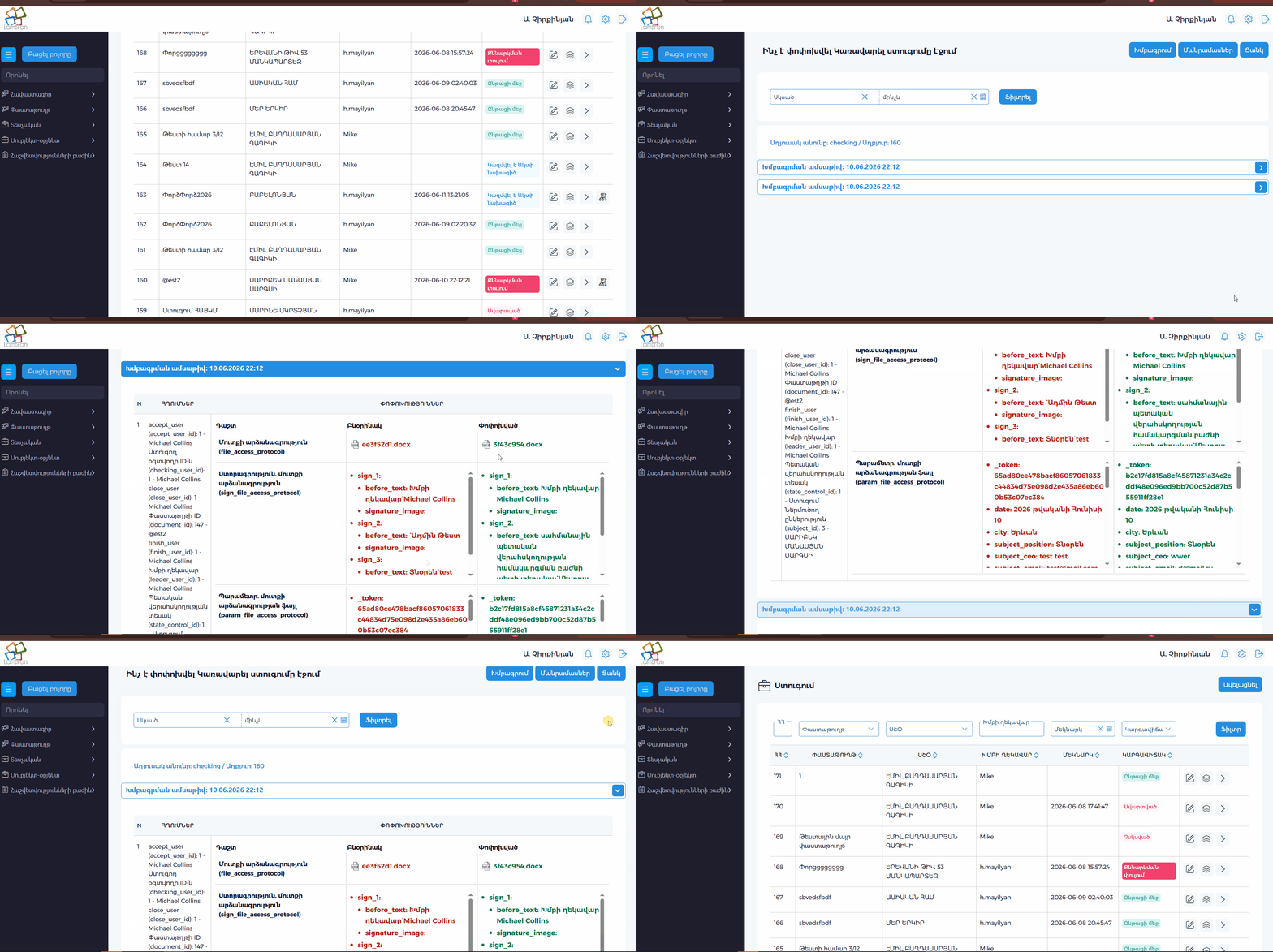
Users with all-users audit permission can see trigger icons for all audited rows:
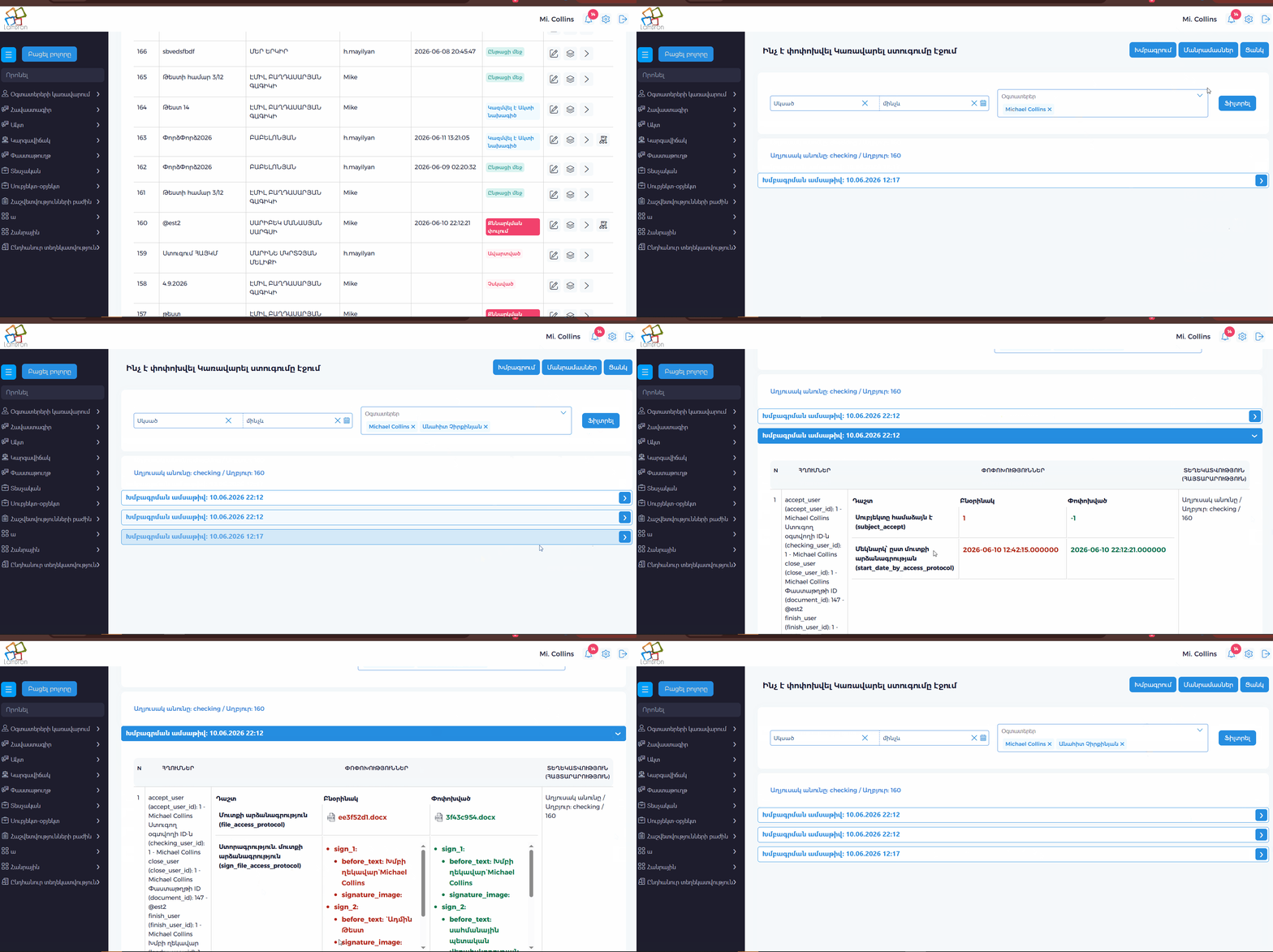
Pagination
The audit page shows 30 accordion groups per page. Pagination appears under the accordion list when there are more than 30 groups.
Existing filters are preserved when moving between pages.
Accordion groups are based on edit date. In all-users mode, groups are also separated by editor.
Showing The Trigger Icon In Lists
Add a custom list button for the audited module.
Example:
$conf['list_button']['trigger'] = true;
$conf['list_button']['trigger_condition'] = '$row["audit_icon_visible"] == 1';
$conf['column_for_condition']['audit_icon_visible'] = $this->audit_trigger_icon_column();
The technical column should return 1 when an audit row exists for the current list row.
Example for checking:
private function audit_trigger_icon_column(): string
{
    $session_user_id = (int)$this->lib->session->get('id', 'user');
    $user_condition = $this->addons->user->authorisation('manage', 'triggers', '1')
        ? ''
        : ' AND `audit_icon_logs`.`edit__user_id` = ' . $session_user_id;

    return "custom|CASE WHEN EXISTS (
        SELECT 1 FROM `change_logs` AS `audit_icon_logs`
        WHERE `audit_icon_logs`.`source_table` = 'checking'
        AND `audit_icon_logs`.`source_id` = `checking`.`id`
        " . $user_condition . "
    ) THEN 1 ELSE 0 END";
}
Then add a route/action for the icon. The action usually redirects to the generic audit page:
public function action_trigger_checking(): void
{
    $id = $this->lib->url->params('id');
    $this->app->redirect($this->lib->url->url('manage', 'triggers', [
        'table' => 'checking',
        'id' => $id,
    ], true));
}
The icon is shown only when trigger_condition is true.
Generator Modes
create_missing
This is the default and safest mode for existing projects.
- Creates
change_logsandchange_log_refsif needed. - Creates missing triggers.
- Skips triggers that already exist.
rebuild
Use this when audit config changed and trigger definitions must be refreshed.
- Creates
change_logsandchange_log_refsif needed. - Drops existing trigger objects.
- Creates trigger objects again from the current config.
dry_run
Use this before applying changes.
- Reads
ddl.ini. - Validates audit config.
- Reports planned trigger names.
- Does not create tables, indexes, or triggers.
Validation Rules
Before generating triggers, AVRO validates the config.
The generator returns clear validation errors when:
pkdoes not exist in the table.actor.user_id_columndoes not exist.actor.date_columndoes not exist.- A
refs[].columndoes not exist. - An
includecolumn does not exist. - An unsupported action is configured.
- No auditable data columns remain after
includeandignoreare applied.
Example validation error:
Audit ref column "contract_id" does not exist in table checking
MySQL And PostgreSQL
The generator supports MySQL and PostgreSQL.
For MySQL it uses:
JSON_OBJECT
JSON_MERGE_PATCH
LAST_INSERT_ID()
<=> null-safe comparison
For PostgreSQL it creates a trigger function and uses:
jsonb_build_object
IS DISTINCT FROM
RETURNING id INTO change_log_id
The same ddl.ini audit config is used for both database engines.
Required Database Permissions
The database user must be able to run:
CREATE TABLE
CREATE INDEX
CREATE TRIGGER
DROP TRIGGER
For PostgreSQL rebuild mode, the user must also be able to drop and create trigger functions.
Recommended Workflow
For an existing project:
- Add
tb_config.trigger.audit.enabled = trueto the tables that need audit logging. - Run dry run mode.
- Fix validation errors, if any.
- Run default
create_missingmode. - Use
rebuildonly after changing audit config for triggers that already exist.