Fast Delete
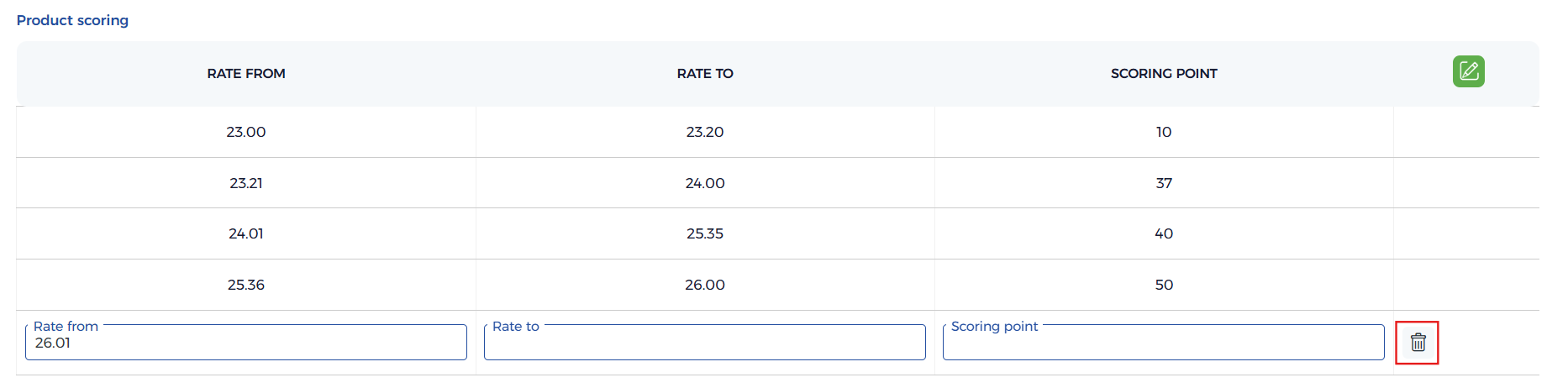
fastdelete is a table button for removing a row inline. It appears as a delete icon
(<a class="ei-delete save fastdelete">) on a row, and removes the record without a separate page.
Fast elements are always used with a table. fastdelete can be enabled both at table level
($table['tb_button']) and per row ($table['tb_list_button']). The fastdelete_action key names the
table/handler the row should be deleted from.
Use fastdelete when:
- A row in an inline detail table needs to be removed.
- You want a one-click delete directly from the list of child records.
- You need delete to work together with
fastadd/fastediton the same table.
Enable fastdelete
Real examples: installment/company_branch.module.php enables it at table level and renders the
delete icon in the AJAX row; per-row deletes are configured through tb_list_button with a
fastdelete_action.
- Row buttons
- PHP (module)
- HTML (output)
{
  "fastdelete": true,
  "fastdelete_action": "company_branch_product",
  "row_id": 5
}
// Table-level button
$table['tb_button'] = ['fastadd' => true, 'fastdelete' => true];

// Per-row delete (one entry per row)
$table['tb_list_button'][] = [
    'fastdelete'        => true,
    'fastdelete_action' => 'company_branch_product',
    'row_id'            => $row['id'],
];
<!-- Delete icon rendered in the row (e.g. from the AJAX row builder) -->
<div class="tc">
  <a class="ei-delete save fastdelete" data-id="tb_5fa2c1" data-action="company_branch_product"></a>
</div>
Behavior
- Bound to a table:
fastdeleteworks inside a table built withmagic->get_table(). - Two levels: Enable it on the whole table with
$table['tb_button'], and/or per row through$table['tb_list_button']. - Action target:
fastdelete_actionnames the table/handler the row is deleted from. - Row identity:
row_id(existing rows) or thedata-idon the icon (newly added rows) identifies which row to remove.
Usage Notes
- Newly added
fastaddrows carry a temporarydata-id(tb_xxxxx) and are removed from the DOM; existing rows use their realrow_idand are deleted from the database viafastdelete_action. - Provide
fastdelete_actionwhenever the row maps to a real database record. - Combine with Fast Add and Fast Edit for full inline row management.