Full Fast Edit
full_fastedit is a table-level button that loads all existing rows of an inline table as
editable inputs at once, so the whole detail table for a record can be edited in place — not just a
single row.
Where Fast Edit makes one row editable, full_fastedit renders every row of the
table (for a given parent record) in edit mode. It is enabled through $table['tb_button'] and takes
the parent record id as its value, so the framework knows which record's rows to load and save.
Use full_fastedit when:
- You want to edit every row of a detail table together (e.g. all rate-scoring rows of a loan product).
- The rows belong to one parent record that is being edited.
- You also want
fastaddto append new rows andfastdeleteto remove existing ones.
Enable full_fastedit on a table
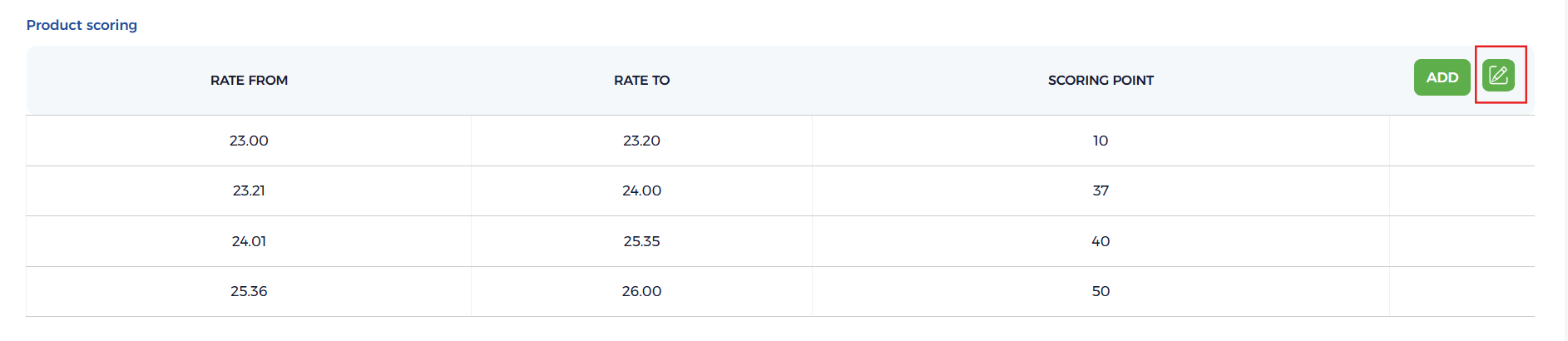
Real example from sysadmin/loan_product.module.php — the loan_product_rate_scoring table is
rendered with fastadd and full_fastedit, where $id is the parent loan product id whose rows are
loaded as editable.
- Table config
- PHP (module)
{
  "tb_id": "loan_product_rate_scoring",
  "tb_get": "add_rate_scoring_row",
  "tb_header": ["rate_from", "rate_to", "scoring_point"],
  "tb_button": { "fastadd": true, "full_fastedit": 42 }
}
private function rate_scoring_table($id = ''): string
{
    $table = [];
    $table['tb_id']     = 'loan_product_rate_scoring';
    $table['tb_get']    = 'add_rate_scoring_row';
    // fastadd appends new rows, full_fastedit loads existing rows of record $id as editable
    $table['tb_button'] = ['fastadd' => true, 'full_fastedit' => $id];

    $table['tb_header'] = [
        $this->language('rate_from'),
        $this->language('rate_to'),
        $this->language('scoring_point'),
    ];
    $table['tb_body'] = [['', '', '']];

    if ($id) {
        $data = $this->addons->magic->exec_query_by_data(
            'loan_product_rate_scoring',
            ['loan_product_id' => $id, 'status' => 1],
            [],
            ' ORDER BY rate_from ASC'
        );

        if ($data) {
            $row_array = [];
            foreach ($data as $row) {
                // Each value is paired with a hidden input keyed by the row id,
                // so full_fastedit can submit every row together
                $row_array[] = [
                    $row['rate_from'] . $this->addons->magic->get_input_hidden('rate_scoring_from[' . $row['id'] . ']', $row['rate_from']),
                    $row['rate_to'] . $this->addons->magic->get_input_hidden('rate_scoring_to[' . $row['id'] . ']', $row['rate_to']),
                    $row['scoring_point'] . $this->addons->magic->get_input_hidden('rate_scoring_point[' . $row['id'] . ']', $row['scoring_point']),
                ];
                $table['tb_list_button'][] = [
                    'fastdelete'        => true,
                    'fastedit'          => false,
                    'row_id'            => $row['id'],
                    'fastdelete_action' => 'loan_product_rate_scoring',
                ];
            }
            $table['tb_body'] = $row_array;
        }
    }

    $table['tb_class'] = 'av_table w-100';
    return $this->addons->magic->get_table($table);
}
Behavior
- Bound to a table:
full_fasteditis set in$table['tb_button']and takes the parent record id as its value ('full_fastedit' => $id). - Loads all rows: Existing rows for that record are rendered as editable inputs (typically keyed by the row id via hidden inputs), so they can all be saved together.
- Works with fastadd/fastdelete: New rows can be appended with
fastadd, and existing rows removed withfastdeleteand theirfastdelete_action.
Usage Notes
- Pass the real parent id (
'full_fastedit' => $id) — an empty id means there are no existing rows to load. - Key each editable cell by
row['id'](e.g.name="rate_scoring_from[' . $row['id'] . ']") so the save handler can match inputs back to their rows. - For editing a single row only, use Fast Edit; to just add or delete rows, see Fast Add and Fast Delete.