List
This guide explains how to generate a page with a list of information. List with standard filters and pagination.
Basic list
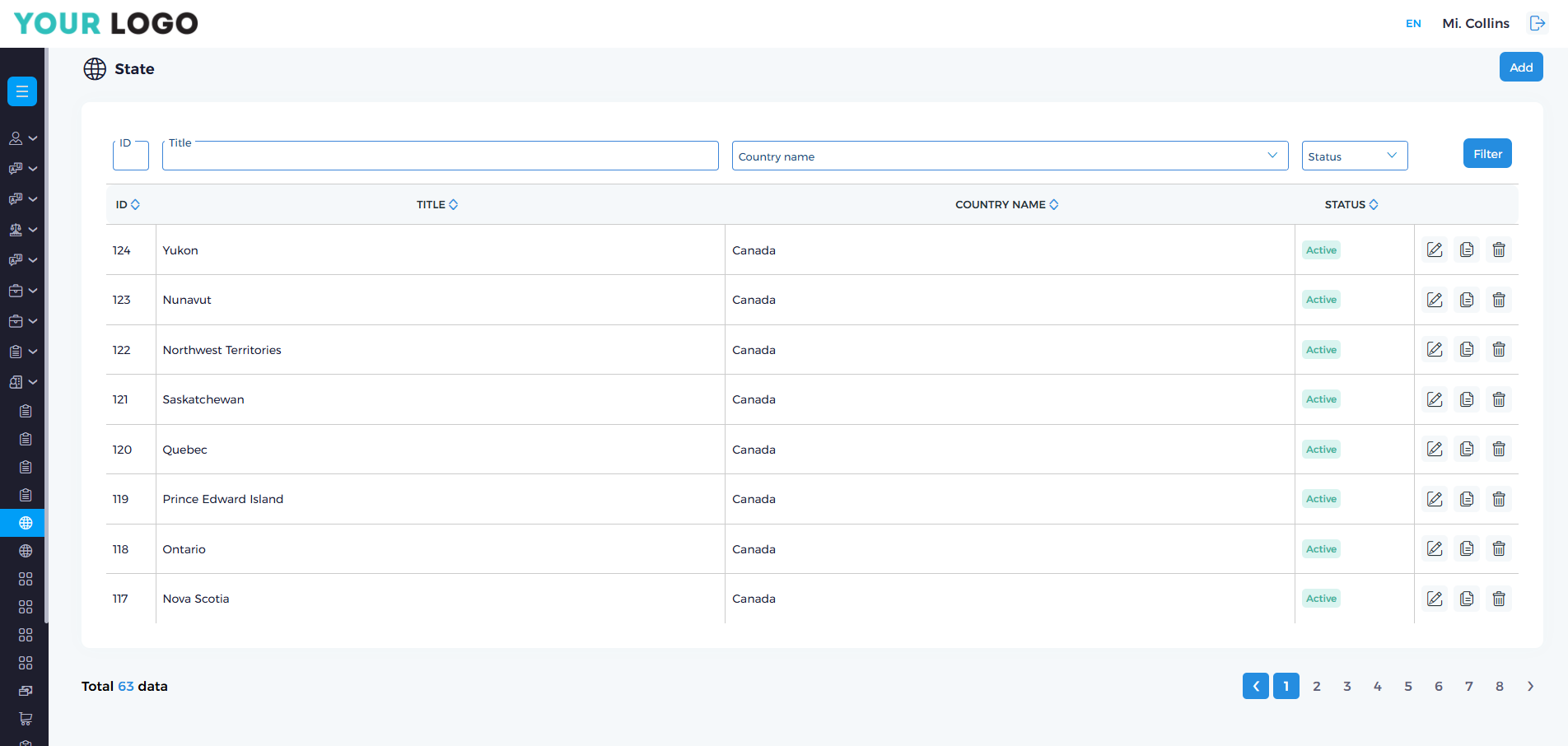
Generate a simple list with standard filters.
For example, we have state and county tables in our database.
- JSON
- PHP
{
  "action": "state",
  "column": {
    "id": "id",
    "title": "text",
    "country-title": "join",
    "status": "status"
  },
  "title": {
    "country-title": "Country Name"
  }
}
public function state(): string
 {
     $conf['action'] = 'state';

     $conf['column'] = [
         'id' => 'id',
         'title' => 'text',
         'country-title' => 'join',
         'status' => 'status',
     ];

     $conf['title'] = [
         'country-title' => $this->app->language('country_name')
     ];

     return $this->addons->direction->listing($conf);
 }
Advanced list
Without filters
Generate a simple list without filters.
- JSON
- PHP
{
    "action": "state",
    "column": {
        "id": "id",
        "title": "text",
        "country-title": "join",
        "status": "status"
    },
    "title": {
        "country-title": "Country Name"
    },
    'quick_filter' => false
}
public function state(): string
{
    $conf['action'] = 'state';

    $conf['column'] = [
        'id' => 'id',
        'title' => 'text',
        'country-title' => 'join',
        'status' => 'status',
    ];

    $conf['title'] = [
        'country-title' => $this->app->language('country_name')
    ];

    $conf['quick_filter'] = false;

    return $this->addons->direction->listing($conf);
}
Default status
Description:
Sets the default filtering behavior for the status field when no specific filter is applied.
- If set to
true, only records withstatus > 0are shown (e.g., "Active"). - If set to a
stringvalue (e.g.,'1','active'), only records matching that exact status will be shown by default.
- JSON
- PHP
{
    "default_status": true
}
// or
{
    "default_status": "1"
}
$params['default_status'] = true;
// or
$params['default_status'] = '1';
Default filtered
Generate a simple list with already filtered result.
For example, we can generate a filtered result of a list where country_id = 17 and status is active: status = 1
- JSON
- PHP
{
    "action": "state",
        "column": {
        "id": "id",
        "title": "text",
        "country-title": "join",
        "status": "status"
    },
    "title": {
        "country-title": "Country Name"
    },
    "filtered": {
        "country_id": "2",
        "state-status": "1"
    }
 }
public function state(): string
{
    $conf['action'] = 'state';

    $conf['column'] = [
        'id' => 'id',
        'title' => 'text',
        'country-title' => 'join',
        'status' => 'status',
    ];

    $conf['title'] = [
        'country-title' => $this->app->language('country_name')
    ];

    $conf['filtered'] = [
        'country_id' => '17',
        'status' => '1'
    ];

    return $this->addons->direction->listing($conf);
}

If you use filtered do not use default_status.
Short title
Description: Optional short labels shown on cards or in compact table views. Key corresponds to column name. When you use shor_title show with tooltips.
- JSON
- PHP
{
    "action": "state",
    "column": {
        "id": "id",
        "title": "text",
        "country-title": "join",
        "status": "status"
    },
    "short_title": {
        "country-title": "Cnt"
    }
    "title": {
        "country-title": "Country Name"
    }
}
public function state(): string
{
    $conf['action'] = 'state';

    $conf['column'] = [
        'id' => 'id',
        'title' => 'text',
        'country-title' => 'join',
        'status' => 'status',
    ];

    $conf['short_title'] = [
        'country-title' => $this->app->language('short_country_name') // Cnt
    ];

    $conf['title'] = [
        'country-title' => $this->app->language('country_name') // Country name
    ];

    return $this->addons->direction->listing($conf);
}
List button
List buttons: Controls the visibility of action buttons on each row in the list view. Available options:
'edit'– Show or hide the edit button.'copy'– Show or hide the duplicate/copy button.'details'– Show or hide the view/details button.'delete'– Show or hide the delete button.
You can navigate to the pages from the list by clicking this icon.
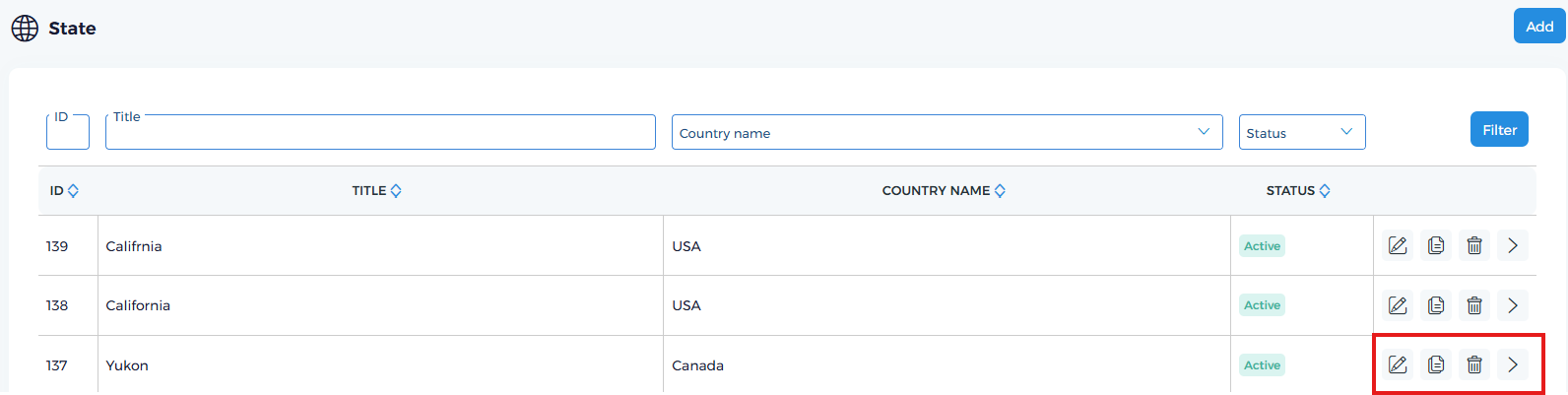
To use the delete function, the user must not only have permission to delete the data, but also have root permission.
You can custom any HTML
Available options:
'before'– Show HTML before list buttons'before_button'– Show HTML after<div class="tc">before list buttons'after'– Show HTML after list buttons'after_button'– Show HTML before</div>after list buttons
Custom condition: You can use conditions to show or hide action buttons based on row data.
Available condition parameters:
edit_condition– Condition for the edit button.details_condition– Condition for the details button.delete_condition– Condition for the delete button.
Using column_for_condition
If your condition uses a column that is not included in the main column list, you must define it in column_for_condition. This ensures the column is included in the SQL query without being displayed in the list.
For example, I want to:
- Show the edit button only if
idis not 11. - Show the details button only if
registration_dateis before '2025-06-01'. - Show the delete button only if
is_lockedis 0 (whereis_lockedis not in the columns list).
$conf['list_button'] = [
    'edit' => true,
    'details' => true,
    'delete' => true,
    'edit_condition' => '$row["id"] != 11',
    'details_condition' => '$row["registration_date"] < "2025-06-01"',
    'delete_condition' => '$row["is_locked"] == 0'
];

// Since 'is_locked' is not in $conf['column'], we must add it here:
$conf['column_for_condition'] = [
    'is_locked' => 'text' // Use the appropriate type (text, number, etc.)
];
- JSON
- PHP
{
    "list_button": {
        "edit": true,
        "copy": false,
        "details": true,
        "delete": true,
        "edit_condition": "$row[\"id\"] != 11",
        "details_condition": "$row[\"registration_date\"] < \"2025-06-01\"",
        "delete_condition": "$row[\"is_locked\"] == 0"
    },
    "column_for_condition": {
        "is_locked": "text"
    }
}
$conf['list_button'] = [
    'edit' => true,
    'copy' => false,
    'details' => true,
    'delete' => true,
    'edit_condition' => '$row["id"] != 11',
    'details_condition' => '$row["registration_date"] < "2025-06-01"',
    'delete_condition' => '$row["is_locked"] == 0'
];

$conf['column_for_condition'] = [
    'is_locked' => 'text'
];
Additional_button
You can add additional buttons to the top of a list.
$conf['additional_button']['Go to somewhere'] = 'link';
Disable top add button
        $conf['list_button'] = [
            'edit' => true,
            'copy' => false,
            'details' => true,
            'delete' => true,
            'list_add' => false
        ];
Excel
$conf['export_excel'] = [];
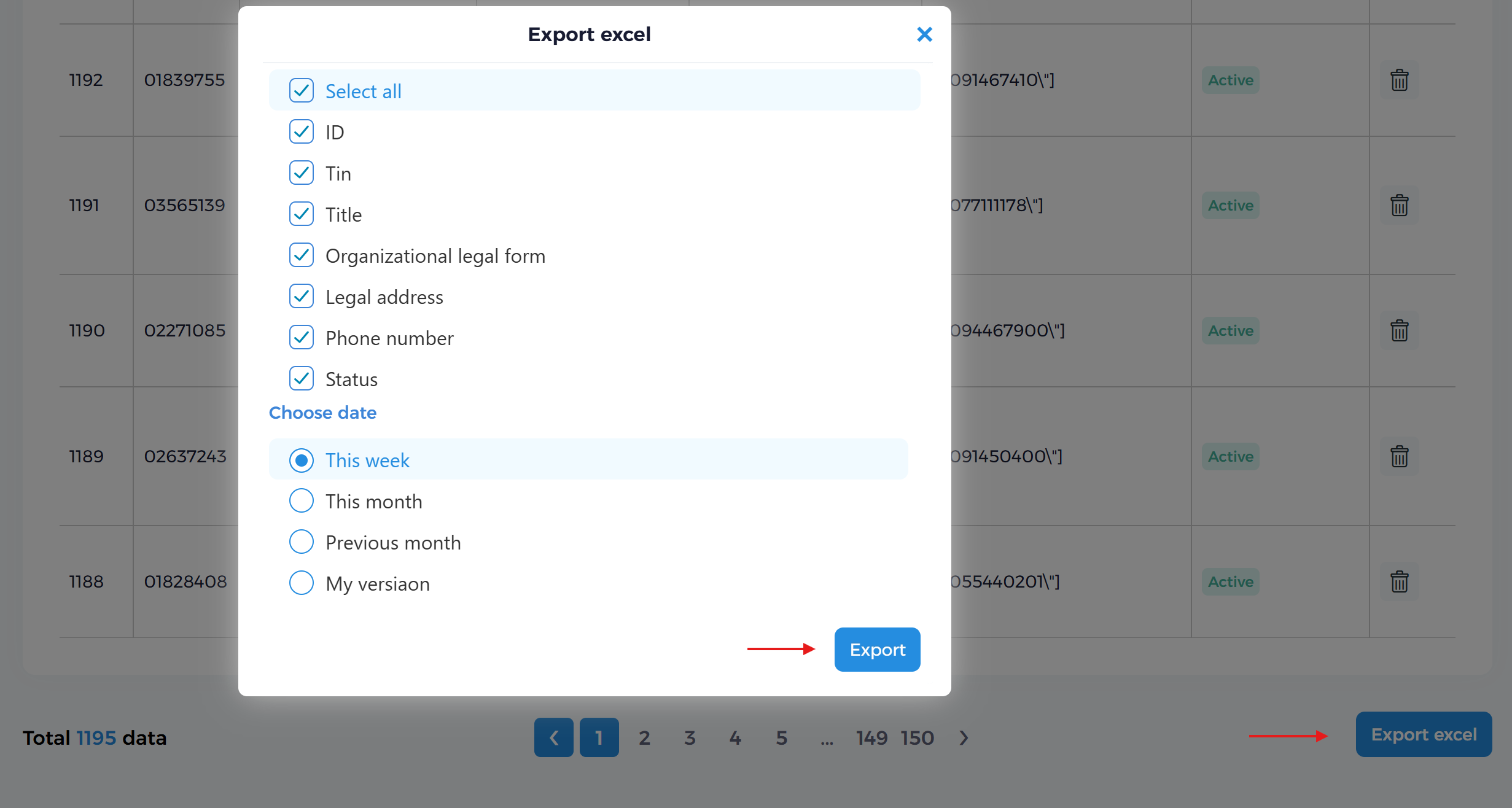
You can choose custom columns, for example:
$conf['export_excel'] =
[
    'id' => 'id',
    'organization_legal_form-title' => 'join',
    'legal_address' => 'text',
    'state-country-title' => 'join'
];
If you want to add columns to the export that are not in the main list, use add_columns_export_excel:
$conf['add_columns_export_excel'] = [
    'registration_date' => 'date',
    'edit_date' => 'date',
    'user-name' => 'join'
];
Export excel as default connected to AVRO EXCEL MICROSERVICE "It can handle huge volumes. And it's work fast."
Options
- Bulk actions
- Custom link inks on list elements
- Custom top button
- Custom list button
Advanced filter
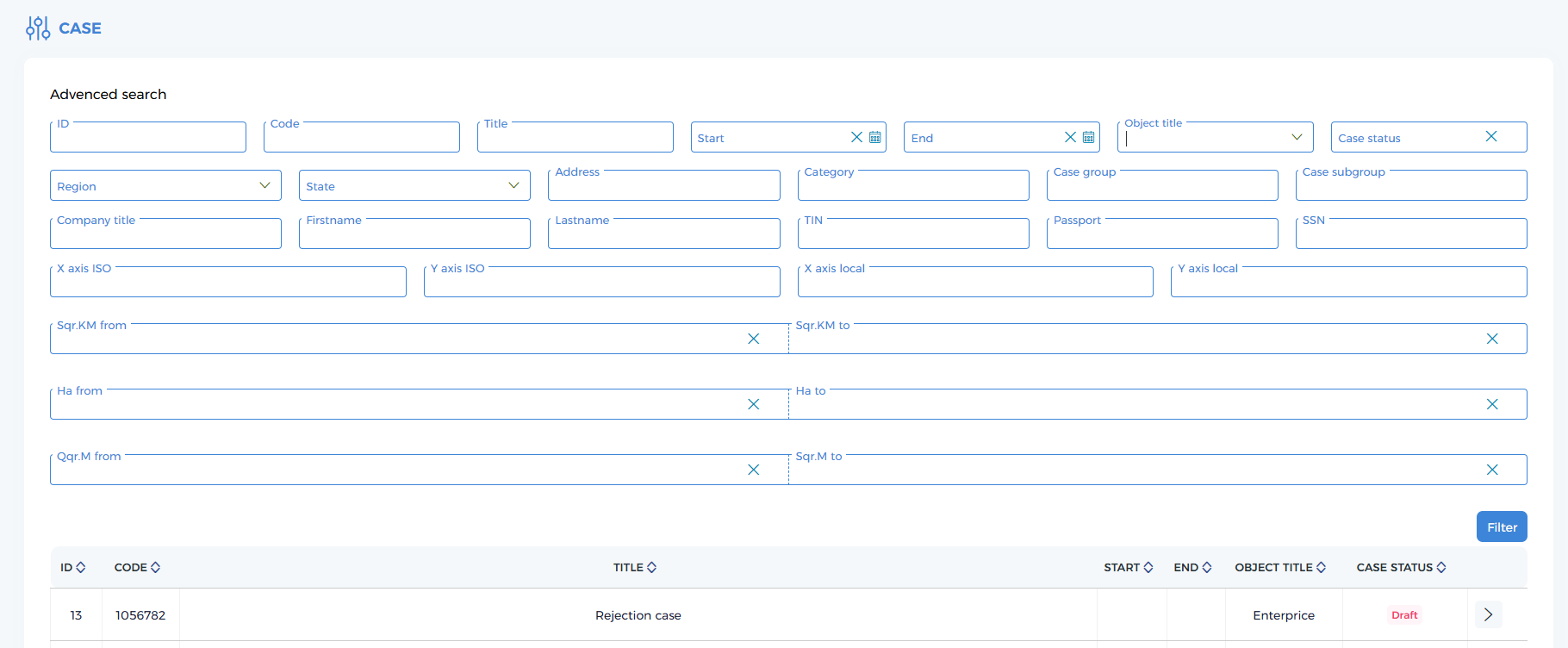
Advanced filter with all parameters Custom data in list
This is an example of an advanced filter and custom data merged with database data: 'advanced_filter' and '<my_key>' => 'list|id'
- JSON
- PHP
{
"action":"cases",
"column":{
  "id":"id",
  "code":"text",
  "title":"text",
  "start_date":"date",
  "end_date":"date",
  "first__category-object-title":"join",
  "status":"custom| `cases_status`"
},
"list":{
  "category":{
    "11":"A","12":"B","13":"C"
  },
  "field_of_work":{
    "11":"Energetic","12":"Finance","13":"Education"
  },
  "subfield_of_work":{
        "11": "Site selection, construction, operation, and decommissioning of facilities important from the perspective of nuclear energy safety",
        "12": "Site selection, construction, operation, and decommissioning of facilities important from the perspective of nuclear energy safety",
        "13": "Site selection, construction, operation, and decommissioning of facilities important from the perspective of nuclear energy safety"
  },
  "join_html":{
    "company-title":"text",
    "company-firstname":"text",
    "company-lastname":"text",
    "company-tin":"text",
    "company-passport":"text",
    "company-psn":"text"
  },
  "quick_filter":false,
  "advanced_filter":{
    "id":"id",
    "code":"text",
    "title":"text",
    "start_date":"date",
    "end_date":"date",
    "first__category-object-title":"join",
    "region-title":"join",
    "marz-title":"join",
    "address":"text",
    "category":"list|id",
    "field_of_work":"list|id",
    "subfield_of_work":"list|id",
    "company-title":"join",
    "company-firstname":"join",
    "company-lastname":"join",
    "company-tin":"join",
    "company-passport":"join",
    "company-psn":"join",
    "x_axis":"text",
    "y_axis":"text",
    "x_axis_arm":"text",
    "y_axis_arm":"text",
    "cases_unit_1":"number_range",
    "cases_unit_2":"number_range",
    "cases_unit_3":"number_range",
    "status":"custom| `cases_status`"
  },
  "advanced_filter_view":{
    "id":{"group":1,"element":1},
    "title":{"group":1,"element":2},
    "start_date":{"group":1,"element":3},
    "end_date":{"group":1,"element":4},
    "code":{"group":1,"element":5},
    "term_of_case":{"group":1,"element":6},
    "first__category-object-title":{"group":1,"element":7},
    "status":{"group":1,"element":8},
    "region-title":{"group":2,"element":1},
    "marz-title":{"group":2,"element":2},
    "address":{"group":2,"element":3},
    "category":{"group":2,"element":4},
    "field_of_work":{"group":2,"element":5},
    "subfield_of_work":{"group":2,"element":6},
    "company-title":{"group":3,"element":1},
    "company-firstname":{"group":3,"element":2},
    "company-lastname":{"group":3,"element":3},
    "company-tin":{"group":3,"element":4},
    "company-passport":{"group":3,"element":5},
    "company-psn":{"group":3,"element":6},
    "x_axis":{"group":4,"element":2},
    "y_axis":{"group":4,"element":3},
    "x_axis_arm":{"group":4,"element":4},
    "y_axis_arm":{"group":4,"element":5},
    "cases_unit_1":{"group":5,"element":1},
    "cases_unit_2":{"group":6,"element":1},
    "cases_unit_3":{"group":7,"element":1}},
    "title":{
      "code":"Code",
      "start_date":"Start",
      "end_date":"End",
      "first__category-object-title":"Object title",
      "region-title":"Region",
      "marz-title":"Marz",
      "category":"Category",
      "field_of_work":"Case group",
      "subfield_of_work":"Case subgroup",
      "status":"Case status",
      "address":"Address",
      "company-title":"Company title",
      "company-firstname":"Firstname",
      "company-lastname":"Lastname",
      "company-tin":"TIN",
      "company-passport":"Passport",
      "company-psn":"SSN",
      "x_axis":"X axis ISO",
      "y_axis":"Y axis ISO",
      "x_axis_arm":"X axis local",
      "y_axis_arm":"Y axis local"
    },
  "custom_status":"cases_status",
  "status":{
    "-100":"Deleted",
    "-2":"Draft",
    "-1":"Պասիվ",
    "1":"In progress - waiting",
    "2":"In progress - rejected",
    "3":"In progress - changed",
    "100":"Finished"
  },
  "status_style":{
    "-100":"passive-item",
    "-2":"passive-item",
    "-1":"passive-item",
    "1":"mai-item",
    "2":"mai-item",
    "3":"ot-item",
    "100":"active-item"
  },
  "default_status":true,
  "list_button":{
    "details":{
      "action":"cases_details"
    }
  }
},
  "removing_the_cast_case":"true"
}
$category_1_level = [...]; //Custom array
$category_2_level = [...]; //Custom array
$category_3_level = [...]; //Custom array

$conf['column'] = [
    'id' => 'id',
    'code' => 'text',
    'title' => 'text',
    'start_date' => 'date',
    'end_date' => 'date',
    'first__category-object-title' => 'join',
    'status' => 'custom| ' . QD . 'cases_status' . QD
];

$conf['list']['category'] = $category_1_level;
$conf['list']['field_of_work'] = $category_2_level;
$conf['list']['subfield_of_work'] = $category_3_level;

$conf['join_html']['company-title'] = 'text';
$conf['join_html']['company-firstname'] = 'text';
$conf['join_html']['company-lastname'] = 'text';
$conf['join_html']['company-tin'] = 'text';
$conf['join_html']['company-passport'] = 'text';
$conf['join_html']['company-psn'] = 'text';

$conf['quick_filter'] = false;

$conf['advanced_filter'] = [
    'id' => 'id',
    'code' => 'text',
    'title' => 'text',
    'start_date' => 'date',
    'end_date' => 'date',
    'first__category-object-title' => 'join',
    'region-title' => 'join',
    'marz-title' => 'join',
    'address' => 'text',
    'category' => 'list|id', //category_1_level_title
    'field_of_work' => 'list|id', //category_2_level_title
    'subfield_of_work' => 'list|id', //category_3_level_title
    'company-title' => 'join',
    'company-firstname' => 'join',
    'company-lastname' => 'join',
    'company-tin' => 'join',
    'company-passport' => 'join',
    'company-psn' => 'join',
    'x_axis' => 'text',
    'y_axis' => 'text',
    'x_axis_arm' => 'text',
    'y_axis_arm' => 'text',
    'cases_unit_1' => 'number_range',
    'cases_unit_2' => 'number_range',
    'cases_unit_3' => 'number_range',
    'status' => 'custom| ' . QD . 'cases_status' . QD
];

$conf['advanced_filter_view'] = [
    'id' => ['group' => 1, 'element' => 1],
    'title' => ['group' => 1, 'element' => 2],
    'start_date' => ['group' => 1, 'element' => 3],
    'end_date' => ['group' => 1, 'element' => 4],
    'code' => ['group' => 1, 'element' => 5],
    'term_of_case' => ['group' => 1, 'element' => 6],
    'first__category-object-title' => ['group' => 1, 'element' => 7],
    'status' => ['group' => 1, 'element' => 8],
    'region-title' => ['group' => 2, 'element' => 1],
    'marz-title' => ['group' => 2, 'element' => 2],
    'address' => ['group' => 2, 'element' => 3],
    'category' => ['group' => 2, 'element' => 4],
    'field_of_work' => ['group' => 2, 'element' => 5],
    'subfield_of_work' => ['group' => 2, 'element' => 6],
    'company-title' => ['group' => 3, 'element' => 1],
    'company-firstname' => ['group' => 3, 'element' => 2],
    'company-lastname' => ['group' => 3, 'element' => 3],
    'company-tin' => ['group' => 3, 'element' => 4],
    'company-passport' => ['group' => 3, 'element' => 5],
    'company-psn' => ['group' => 3, 'element' => 6],
    'x_axis' => ['group' => 4, 'element' => 2],
    'y_axis' => ['group' => 4, 'element' => 3],
    'x_axis_arm' => ['group' => 4, 'element' => 4],
    'y_axis_arm' => ['group' => 4, 'element' => 5],
    'cases_unit_1' => ['group' => 5, 'element' => 1],
    'cases_unit_2' => ['group' => 6, 'element' => 1],
    'cases_unit_3' => ['group' => 7, 'element' => 1],
];

$conf['title'] = [
    'code' => $this->language('code'),
    'start_date' => $this->language('start_date'),
    'end_date' => $this->language('end_date'),
    'first__category-object-title' => $this->language('object_title'),
    'region-title' => $this->app->language('region'),
    'marz-title' => $this->app->language('marz'),
    'category' => $this->language('category'),
    'field_of_work' => $this->language('field_of_work'),
    'subfield_of_work' => $this->language('subfield_of_work'),
    'status' => $this->language('cases_status'),
    'address' => $this->language('address'),
    'company-title' => $this->app->language('title'),
    'company-firstname' => $this->language('firstname'),
    'company-lastname' => $this->language('lastname'),
    'company-tin' => $this->language('tin'),
    'company-passport' => $this->language('passport'),
    'company-psn' => $this->language('psn'),
    'x_axis' => $this->language('x_axis'),
    'y_axis' => $this->language('y_axis'),
    'x_axis_arm' => $this->language('x_axis_arm'),
    'y_axis_arm' => $this->language('y_axis_arm')
];

$conf['custom_status'] = 'cases_status';
$conf['status'] = $get_statuses['status'];
$conf['status_title'] = $get_statuses['status'];
$conf['status_style'] = $get_statuses['status_style'];
$conf['default_status'] = true;
$conf['list_button']['details']['action'] = 'cases_details';
$conf['removing_the_cast_case'] = 'true';

return $this->addons->direction->listing($conf);
Custom value
Description: Allows you to define custom display values for specific columns. When a column value matches a key in the custom_value array, it displays the corresponding value instead.
For example, you can display "Paid" or "Unpaid" instead of numeric values for a payment_status field.
- JSON
- PHP
{
    "action": "orders",
    "column": {
        "id": "id",
        "code": "text",
        "title": "text",
        "registration_date": "date",
        "payment_status": "text",
        "status": "status"
    },
    "title": {
        "payment_status": "Payment Status"
    },
    "custom_value": {
        "payment_status": {
            "1": "Paid",
            "0": "Unpaid"
        }
    },
    "custom_value_style": {
        "payment_status": {
            "1": "my-item",
            "0": "active-item"
        }
    }
}
$conf['action'] = 'orders';

$conf['column'] = [
    'id' => 'id',
    'code' => 'text',
    'title' => 'text',
    'registration_date' => 'date',
    'payment_status' => 'text',
    'status' => 'status'
];

$conf['title'] = [
    'payment_status' => $this->app->language('payment_status')
];

$conf['custom_value'] = [
    'payment_status' => [
        1 => 'Paid',
        0 => 'Unpaid'
    ]
];

$conf['custom_value_style'] = [
    'payment_status' => [
        1 => 'my-item',
        0 => 'active-item'
    ]
];

return $this->addons->direction->listing($conf);

custom_value– Defines the mapping of actual values to display valuescustom_value_style– Optional CSS classes to apply styling to each value
Available style classes:
active-item– Green/active statuspassive-item– Gray/inactive statussuspended-item– Orange/suspended statusmai-item– Blue styleot-item– Purple stylemy-item– Custom/yellow style